
A lab workspace built around the exam
Private machines, your own Kali, flags per host and a report at the end. Onyx sits alongside at the help level you choose.
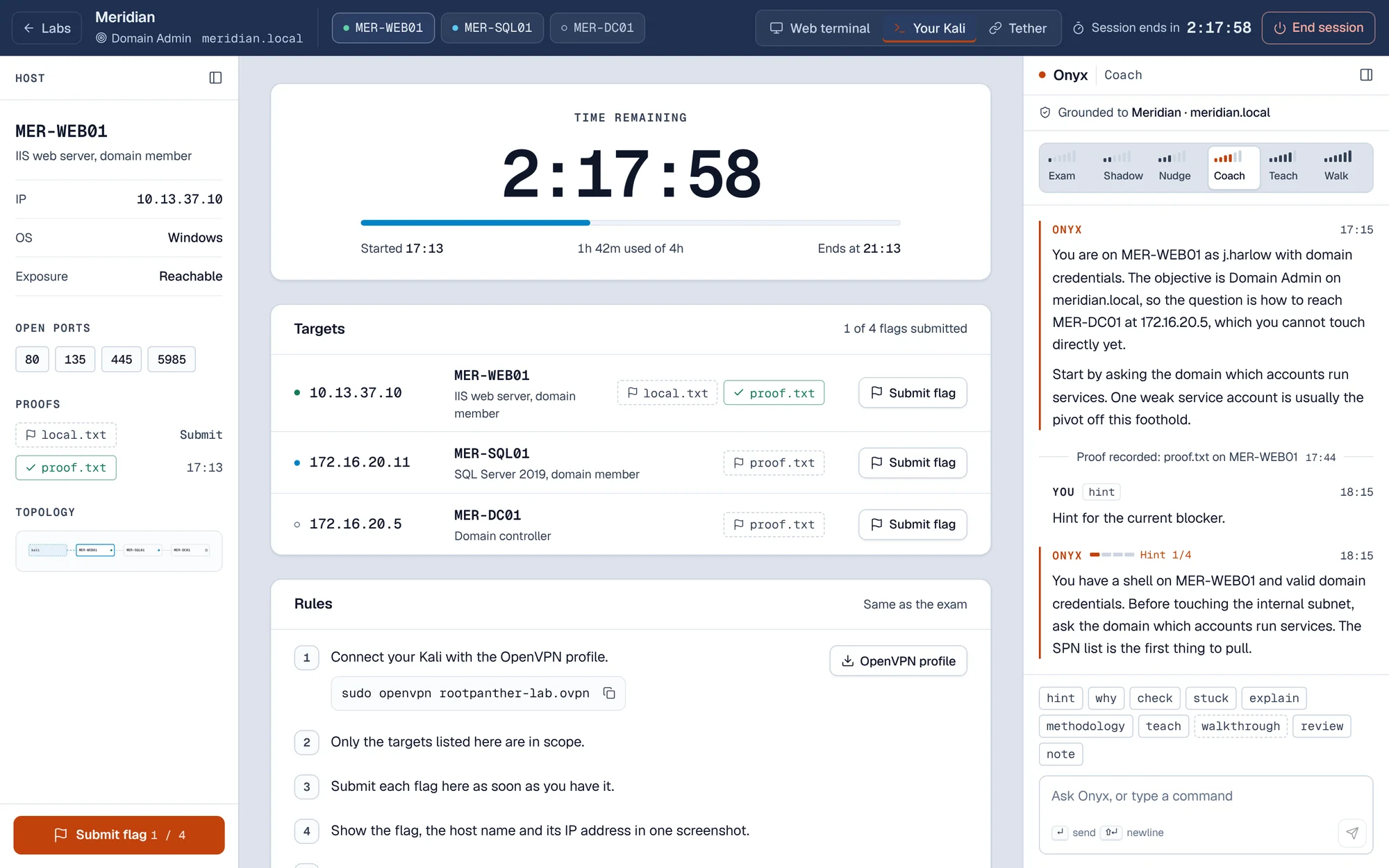
Everything for the run on one screen
The lab workspace keeps the facts of the run in view, so you spend your time on the machines.
- Host panel with what you know about each machine so far.
- Targets and rules in the middle, with time remaining and flags submitted.
- Onyx on the right, grounded to this scenario, at the help level you set.
- Notes saved as you go, ready for the report.
Connect your own Kali over OpenVPN
The exam has you work from your own machine. So does the lab. Download your profile, connect, and the lab network is yours.
- Download the profile from the lab workspace.
- Connect from your Kali with one command.
- Work your own network. Each session gets an isolated network, and only your VPN reaches it.
sudo openvpn rootpanther-lab.ovpnAway from your own machine? A Kali terminal in the browser is on the way for paid plans. Coming soon
$ sudo openvpn rootpanther-lab.ovpn
Initialization Sequence Completed
$ ip -brief addr show tun0
tun0   UNKNOWN   10.13.37.201/24
$ ping -c 1 10.13.37.10
64 bytes from 10.13.37.10: icmp_seq=1 ttl=127
1 packets transmitted, 1 received, 0% packet loss
Exam realism, on purpose
The lab tells you what the exam tells you. The OS, the role, the open ports and the network map fill in as you discover them.
- IP
- 172.16.20.11
- Exposure
- Internal
- OS
- Not found yet
- Role
- Not found yet
- Open ports
- Not found yet
- OS
- Windows
- Role
- SQL Server 2019, domain member
- Open ports
- 13544514335985
The host panel starts with what the exam gives you
Its name, its IP and whether you can reach it from your VPN. The OS, role and open ports fill in as you discover them, and so does the network map.
Flags go in per host, with the screenshot rule
Paste each flag against its host as you find it, and Rootpanther works out whether it is local.txt or proof.txt. The exam's screenshot rule stays in front of you, so your evidence is ready for the report.
- Type
- Exam simulation
- Time limit
- 24 hours
- Help used
- None
Exam simulation is silent
A full timed run of up to 24 hours, like the real exam. Onyx says nothing, and the run is logged as clean.
Labs and sessions
Three kinds of scenario. Each runs on machines that exist only for your session.
AD set
A small Active Directory domain. For example 3 hosts: a web server, a SQL server and a domain controller.
Standalone
One machine. Enumeration, a way in and privilege escalation.
Exam simulation
A full timed run with Onyx silent. The run is logged as clean.
- Labs at a time
- OneEnd a session before you launch the next.
- Session length
- Up to 4 hoursExtend in 30 or 60 minute steps, up to 8 hours.
- Exam simulation
- Up to 24 hoursLike the real exam.
- Idle shutdown
- After 30 minutesYou get a warning at 25 minutes without activity.
- When a session ends
- Machines are destroyedThe next launch gives you fresh machines.
- What you keep
- Notes, flags, progress and reportsThey stay on your account.
Onyx, at the level you choose
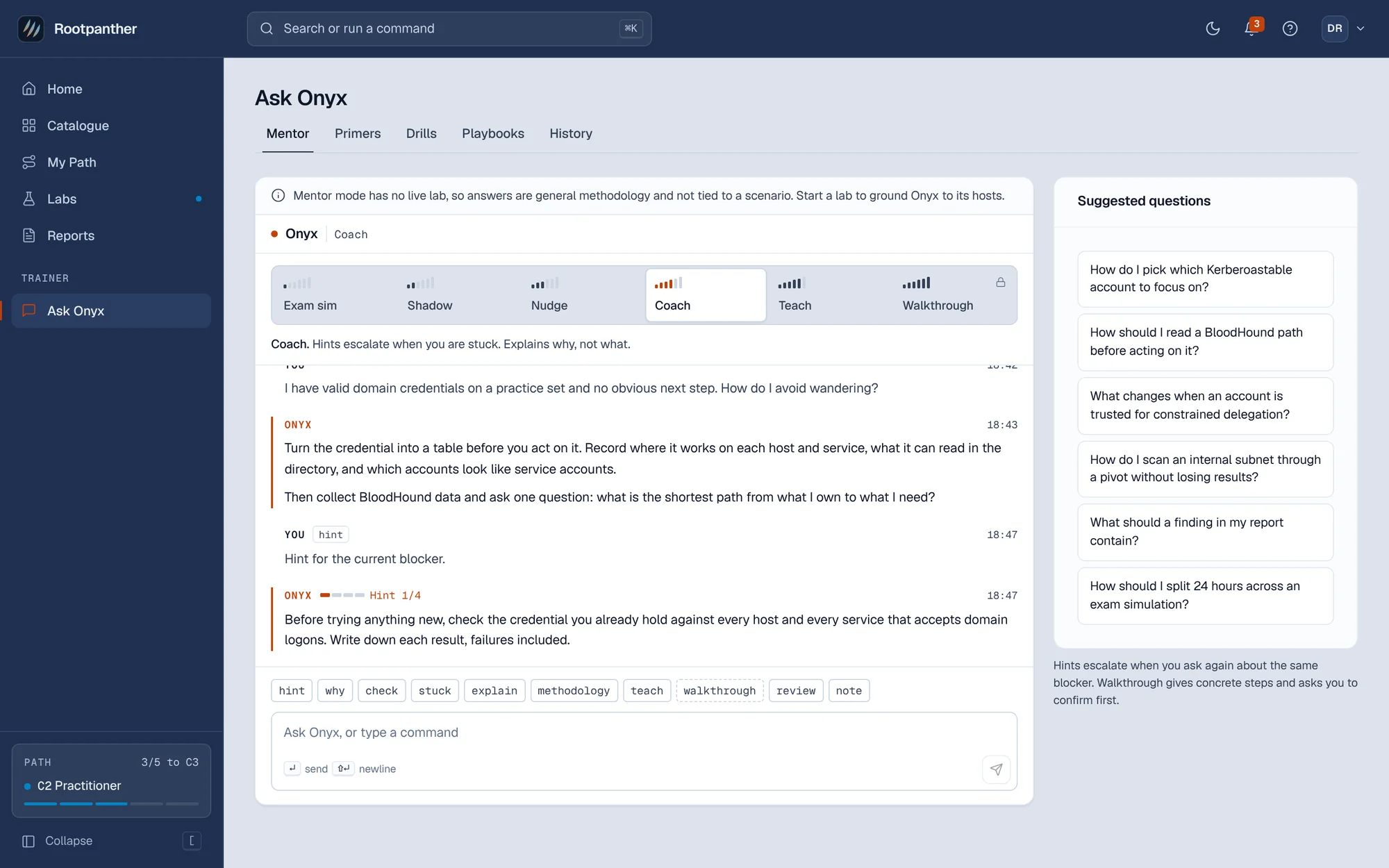
Six help levels, from silent to step by step. Onyx is grounded to the scenario and the host you are on.
- Change the level any time. The run records every change.
- Walkthrough asks first. Concrete commands only after you confirm.
- Never hands out flags, and never talks during an exam simulation.
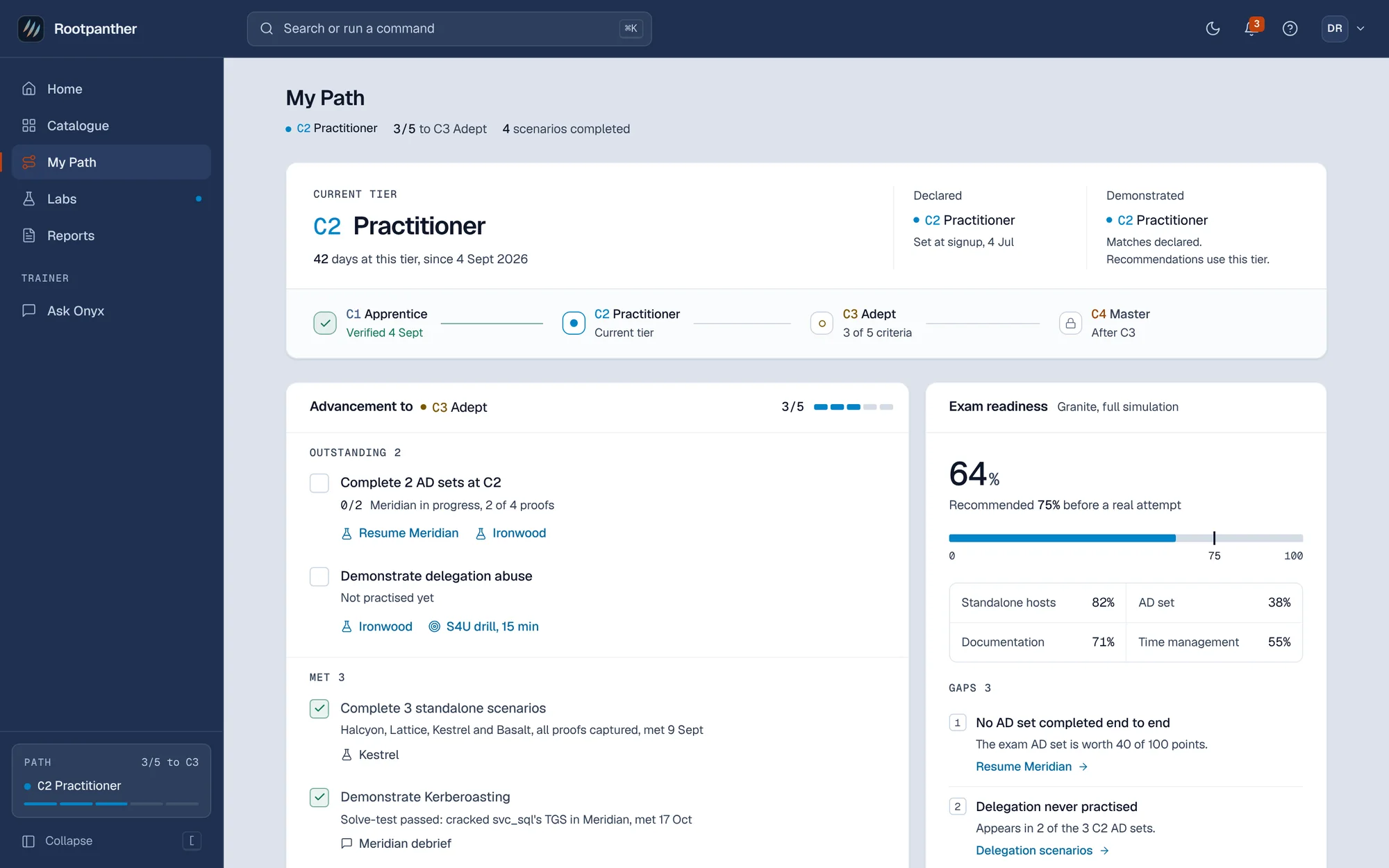
My Path: four tiers, earned by finishing
Advancing needs real finishes. For example, moving past C2 takes three C2 scenarios completed without the two highest help levels, plus one passed report.
-
C1
Apprentice
New to OSCP-style work. Single hosts, enumeration and your first privilege escalations.
-
C2
Practitioner
Comfortable on standalone boxes. Small AD sets, Kerberoasting and pivoting.
-
C3
Adept
Working through AD chains. ACL abuse, delegation and multi-hop pivots.
-
C4
Master
Exam-ready. Forest trusts, certificate abuse and full timed simulations.
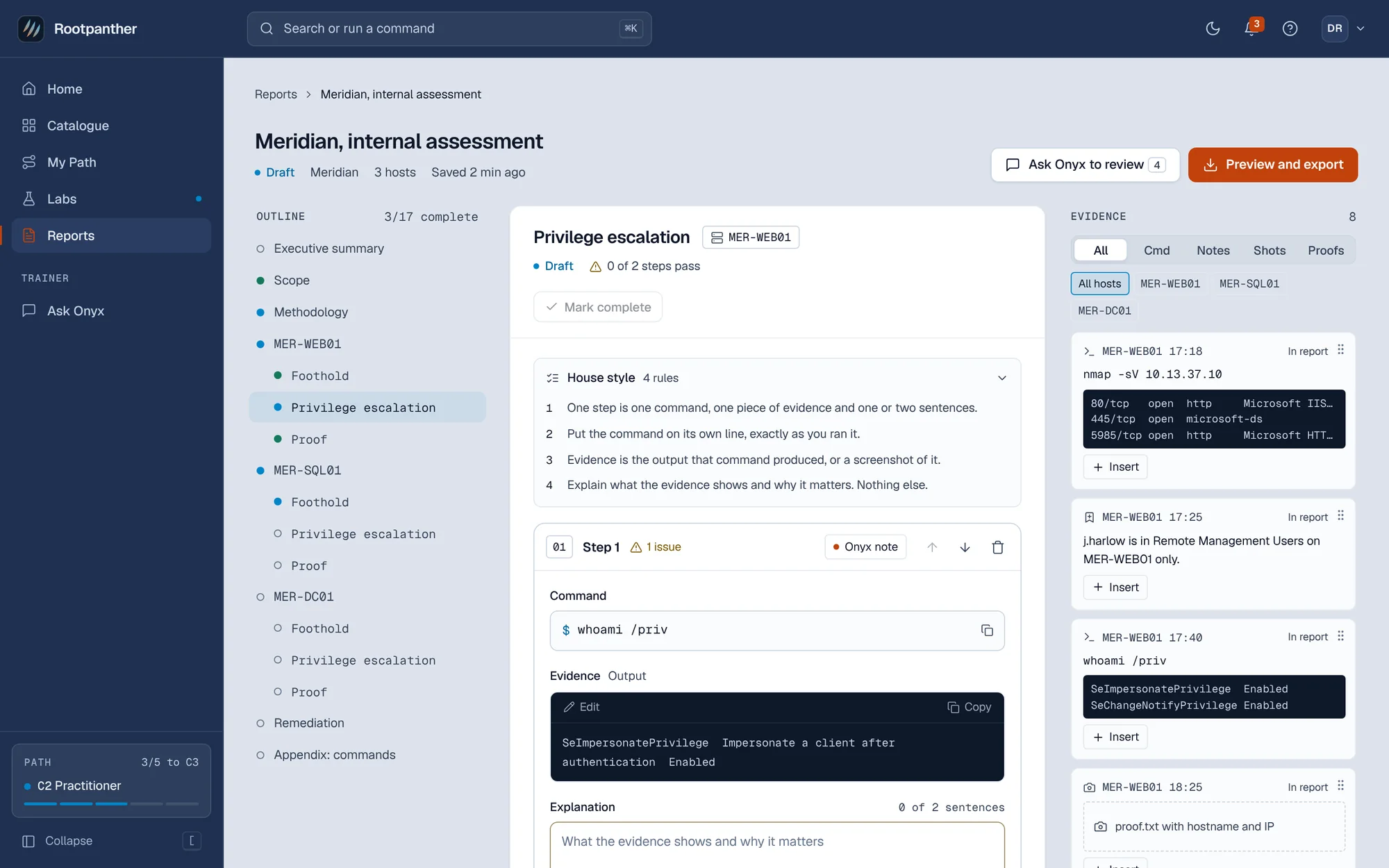
Reports and debriefs
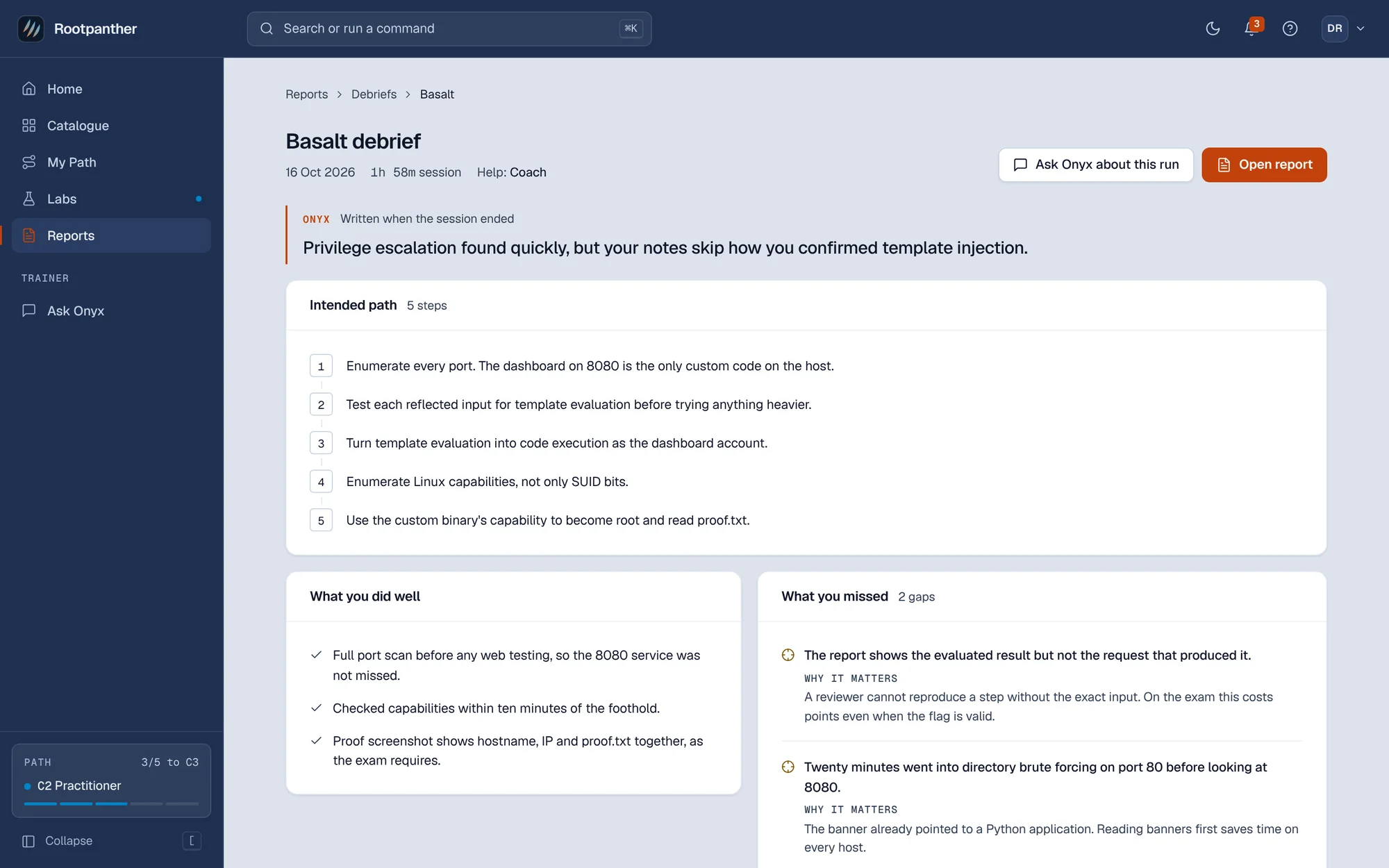
Write the report the exam asks for while the run is fresh, then read what Onyx noticed.
Start on the free plan
Primers, drills and Onyx cost nothing. Start the 7-day trial when you want your first lab.